


New article
Recently updated
Hash symbols appearing around words in Audit & Risk (for example, ##application##)

Who is this article for?
Users
No special permissions are required to resolve the issue.
After a period of inactivity, some words in Audit & Risk may appear surrounded by hash symbols. Refreshing the page fixes it.
Issue
When you re-enter Audit & Risk after your browser has been open for a while, some words are wrapped in double hash symbols. For example:
- “Welcome to ##application##”
- ##audit##
- ##risk##
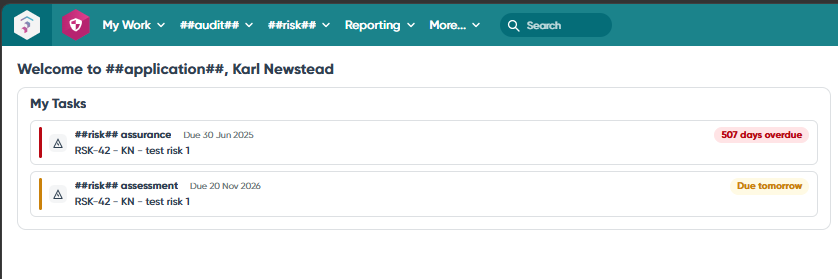
Any terminology word that can have its alias changed is displayed with hash signs around it when the terminology hasn’t loaded properly. This happens if your browser has been open for some time and you then return to Audit & Risk.
Solution
- Press F5 to refresh the page.
- The display will correct itself and the terminology will show as normal.